
Tools
Configure MCP servers, web search, and context controls
Tools extend what Claw can do beyond base prompting. A good tools setup adds capability without creating unnecessary risk or operational noise.
Open Settings > Tools to configure integrations and capability controls.
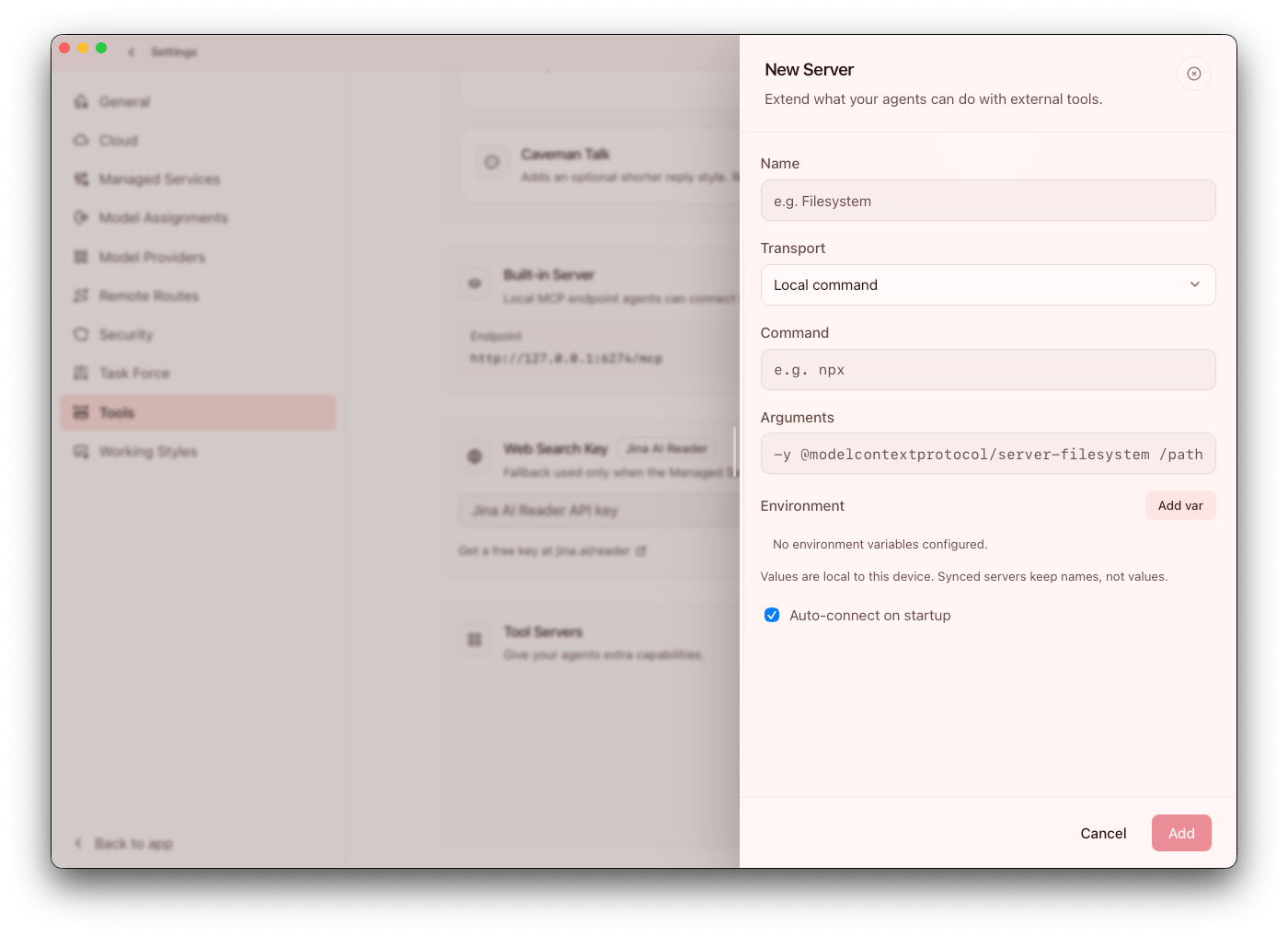
Tool areas
- Context Saver controls
- Context Scout controls
- Skills Hub
- Computer Use
- Built-in local MCP endpoint
- Web search key setup
- Source attribution visibility
- External MCP servers
Treat tools as capability expansion, not default-on settings. Every enabled tool should map to a concrete workflow requirement.
MCP server types
Local command(stdio)Remote URL(http)
For remote MCP servers, Claw supports secure header storage and reveal/replace flows. As a rule, start local first and introduce remote MCP only after security review and owner assignment.
Recommended first MCP rollout
- Add one low-risk local MCP server
- Validate tool availability and response quality
- Add remote MCP endpoints only after security review
- Expand agent access gradually
This staged rollout keeps blast radius small and makes it easier to trace output quality issues back to a specific integration.
Built-in local MCP endpoint
Claw exposes a built-in local endpoint with auth header details for local integration scenarios. Use this for low-latency local workflows where you want tighter control and simpler dependency management.
Web Search
You can set a Jina key for richer search behavior.
- Without key: limited behavior
- With key: fully enabled supported search flows
Web search answers can include source attribution:
- Inline source badges in assistant responses
- A full Sources drawer with links, domains, titles, and snippets
- Network Guard blocked-result counts (when applicable)
Source visibility is especially useful in team contexts because it improves auditability and reduces trust gaps in generated answers.
Context Scout
Context Scout is a pre-send workspace discovery flow for local workspace chats.
- Modes:
Fix,Plan,Review - Depth:
Lean,Balanced,Deep - Optional review-before-send flow
- Optional dedicated model assignment
Context Scout is unavailable when chat context has no workspace or when running inside an agent chat. Use Scout when quality depends on repository or workspace context, not for every prompt. For setup, modes, depth, review-before-send behavior, and troubleshooting, see Context Scout.
Skills Hub
Skills Hub provides in-app workflows to discover, inspect, install, update, disable, and remove skills.
Use Skills Hub to keep skill management visible and versioned inside operations instead of relying on ad-hoc manual distribution.
Operational guidance:
- Install skills only from trusted sources
- Validate behavior in low-risk workflows before broad use
- Review and disable stale or duplicate skills
Computer Use
Computer Use lets compatible chats and agents see and control apps on the local computer. It is available on macOS and Windows.
Setup model:
- Install the local helper from Settings > Tools
- Turn Computer Use on globally after setup
- Enable Computer Use per chat or agent where UI interaction is required
- On macOS, grant required Accessibility and Screen Recording permissions when prompted
- On Windows, use the in-app setup/check flow
Use Computer Use only when a workflow truly needs UI interaction. Prefer files, APIs, shell commands, or MCP tools when they can complete the work more safely and predictably.
Context Saver and Caveman Talk
Tools includes Context Saver capabilities such as:
- Output Trimming controls
- Installed/supported status visibility
- Refresh/update flows
It also includes Caveman Talk mode for ultra-brief response behavior. Reserve ultra-brief modes for operators who already understand the workflow context and do not need explanatory output.
Airlock and web controls
If agents need web access, configure Airlock policy controls so allowed and blocked website behavior is explicit.
Use Airlock with Network Guard and agent permissions for layered outbound control. For full setup guidance, see Airlock.
Operational guidance
- Start with minimal tool surface area
- Gate high-impact tools behind agent-specific policies
- Monitor quality and token usage after enabling new tools
- Re-test critical playbooks after tool changes
Assign ownership for each external MCP integration so credential rotation, outages, and updates are handled predictably.