
Msty Studio 3.x · Desktop guide
Create a Knowledge Stack
Prepare your own sources for use in conversations.
A Knowledge Stack turns documents and other sources into searchable context. Use it when a model needs to answer from your material.
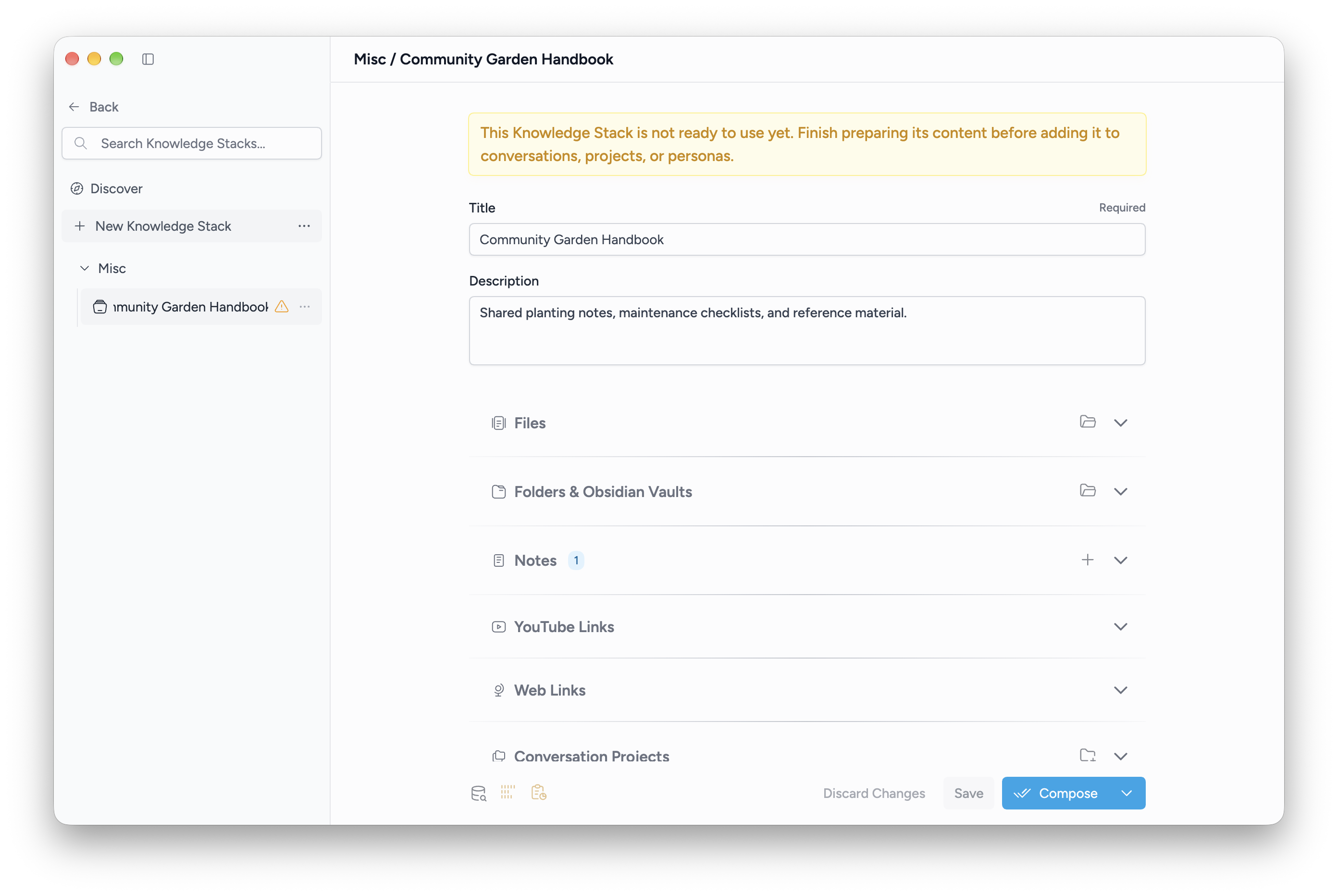
Create and compose
- Open Knowledge Stacks and choose New Knowledge Stack.
- Enter a title and, optionally, a description.
- Add content under Files, Folders, Notes, YouTube Links, Web Links, Conversations, or Conversation Projects.
- Open Compose Settings to choose an available embedding model and review how content is divided into chunks.
- Choose Compose and wait for the stack to become ready.
Save stores changes to the stack. Compose prepares its content for search. A saved stack without a ready index cannot be added to a conversation.
Use it in a conversation
Open the conversation's Knowledge Stacks add-on and select a ready stack. You can also attach stacks to a project or persona for repeated use.
Ask a question that the selected sources can answer. For example, after composing your project notes, ask: “Which tasks are still open?”
See Add sources and Query Settings for more control.