
Msty Studio 3.x · Desktop guide
Personas
Create reusable assistant personas and organize how they work.
Start with a persona
- Open Personas > Assistants.
- Browse Discover, preview a persona, and choose Install.
- Choose Use in chat, or select that persona from a conversation's persona control.
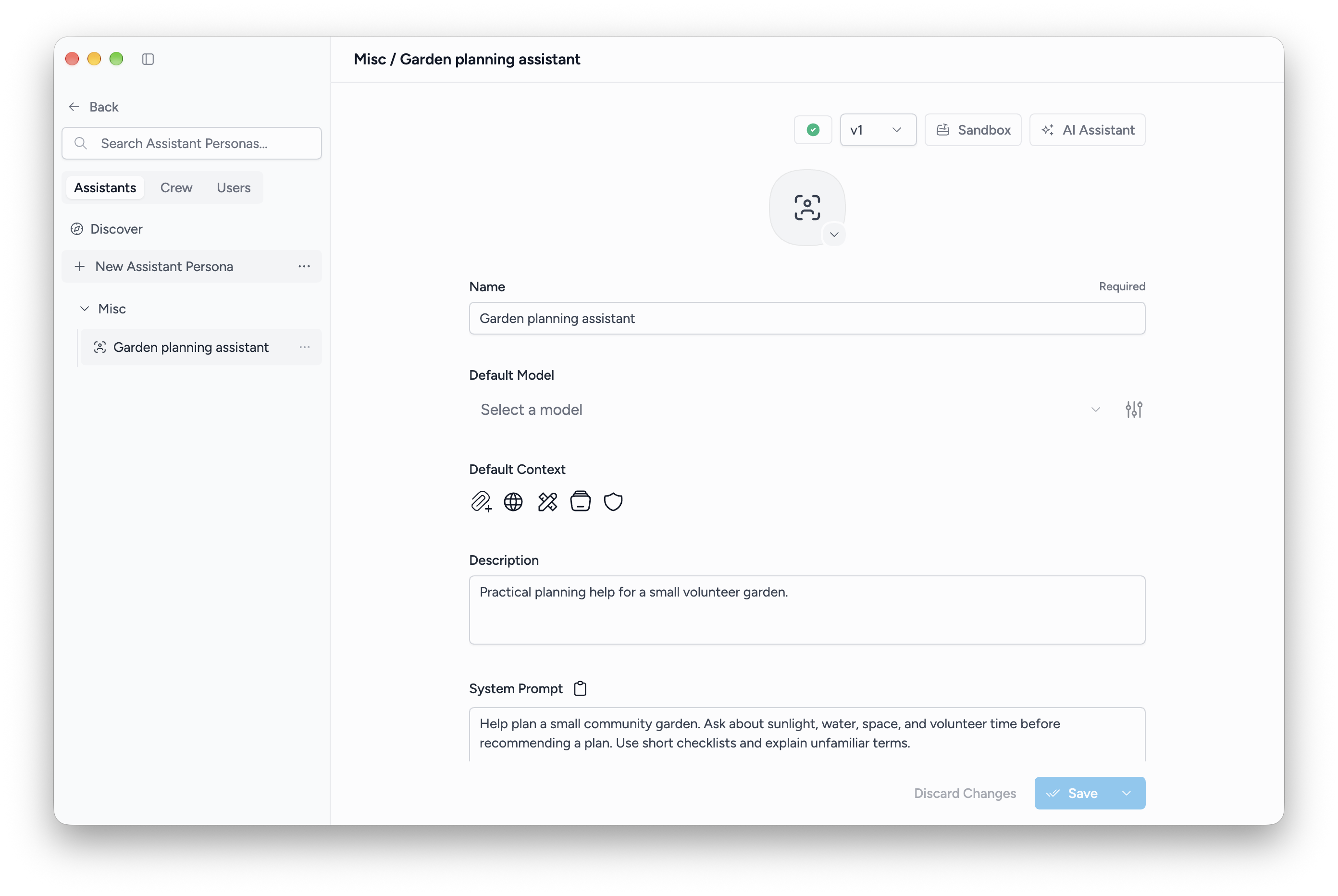
Create your own
- Choose New Assistant Persona.
- Give it a name and write its system prompt. Describe its role, task, and expected response style.
- Optionally assign a model, tools, context, Knowledge Stacks, Live Contexts, or few-shot examples.
- Choose how its system prompt combines with the conversation prompt, then Save.
- Open Sandbox to try it before using it in your work.
For example, an editing persona can ask the assistant to preserve the author's meaning, shorten long sentences, and explain substantial edits.
Organize and revise
Use folders and tags to group personas. Save as Version records a named revision; the version selector lets you inspect saved versions. The persona menu offers cloning and export.
Users stores user personas, including notes and structured memories. Crew combines assistant personas for crew conversations.
Changes to a saved persona and the instructions already applied to a conversation are distinct. Check the conversation's selected persona and prompt when testing a revision.