
Connected apps
A connected app is a server app, such as Msty Sail or Msty Stack, that uses this machine with its own credential. Instead of copying an API key into the app, you approve the app in Nexus. The app collects its credential by itself and renews it every day.
Why pair instead of using a key:
- Nobody copies or pastes a secret.
- The credential renews on its own. A plain key never changes until you rotate it.
- You see the app, its health and its usage here, and you can cut it off in one click.
- The app can report usage and cost per person, without their prompts.
Nexus never calls the app. The app does all the asking. So pairing works even when the app can’t be reached from Nexus, for example when Nexus is behind your router and the app is hosted.
Pair an app
Section titled “Pair an app”- In the app, start pairing with Nexus and enter this machine’s address. In Sail, that’s Admin → Nexus → Pair with Nexus.
- The app shows a code, such as
K7QM-4ZP2. - In Nexus, open Connected apps on the machine the app should use.
- Under Waiting for approval, find the request. Check that Code matches the one the app shows, and that the name and address are what you expect.
- Check what it Asks for: models, web search, tools, or all three.
- Click Approve.

The app updates on its own and starts working. Click Deny to refuse: the app gets no access and can ask again later. A request that nobody answers expires after 15 minutes.
You can also approve from the terminal on the Nexus machine:
msty-nexusctl apps approve K7QM-4ZP2Skip the code with a connect link
Section titled “Skip the code with a connect link”- Click Make connect link.
- Click Copy link and send it to whoever runs the app, through a trusted channel.
- They paste it where the app asks for the Nexus address.

The app connects at once, with models, web search and tools. The link works once and expires after 30 minutes. Restarting Nexus cancels unused links.
A link made in the web Console names the machine’s remote or private network address, so an app on another computer can use it. If the machine has neither turned on, the link names the machine itself and works only for an app on that machine. The page says so; turn on Access from anywhere or private network access, then make a new link.
One click through Msty Account
Section titled “One click through Msty Account”When the app’s admin is signed in to Msty Account and manages the same organization as this Nexus, the app can find the organization’s machines and pair right away. Only owners and admins, and team managers for their teams’ machines, can do this. You still decide access in Nexus.
Check the machine fingerprint
Section titled “Check the machine fingerprint”The page shows this machine’s Machine key fingerprint. A connected app can show the same one. If they don’t match, the app isn’t talking to this machine.
What an app can do
Section titled “What an app can do”You grant access in three parts, and an app gets only what you grant:
| Access | Lets the app |
|---|---|
| Models | Chat, embeddings and the other model requests through the Gateway |
| Web search | Search and fetch pages with Web Search |
| Tools | Call tools through Tools Gateway |
Every app can also read the list of models. An app can never change Nexus settings, keys or other apps.
Each connected app uses one of the machine’s client API key slots, however often its credential renews. If pairing can’t create a credential, remove an unused app or key, or check your plan’s key limit. See Connections.
Watch your apps
Section titled “Watch your apps”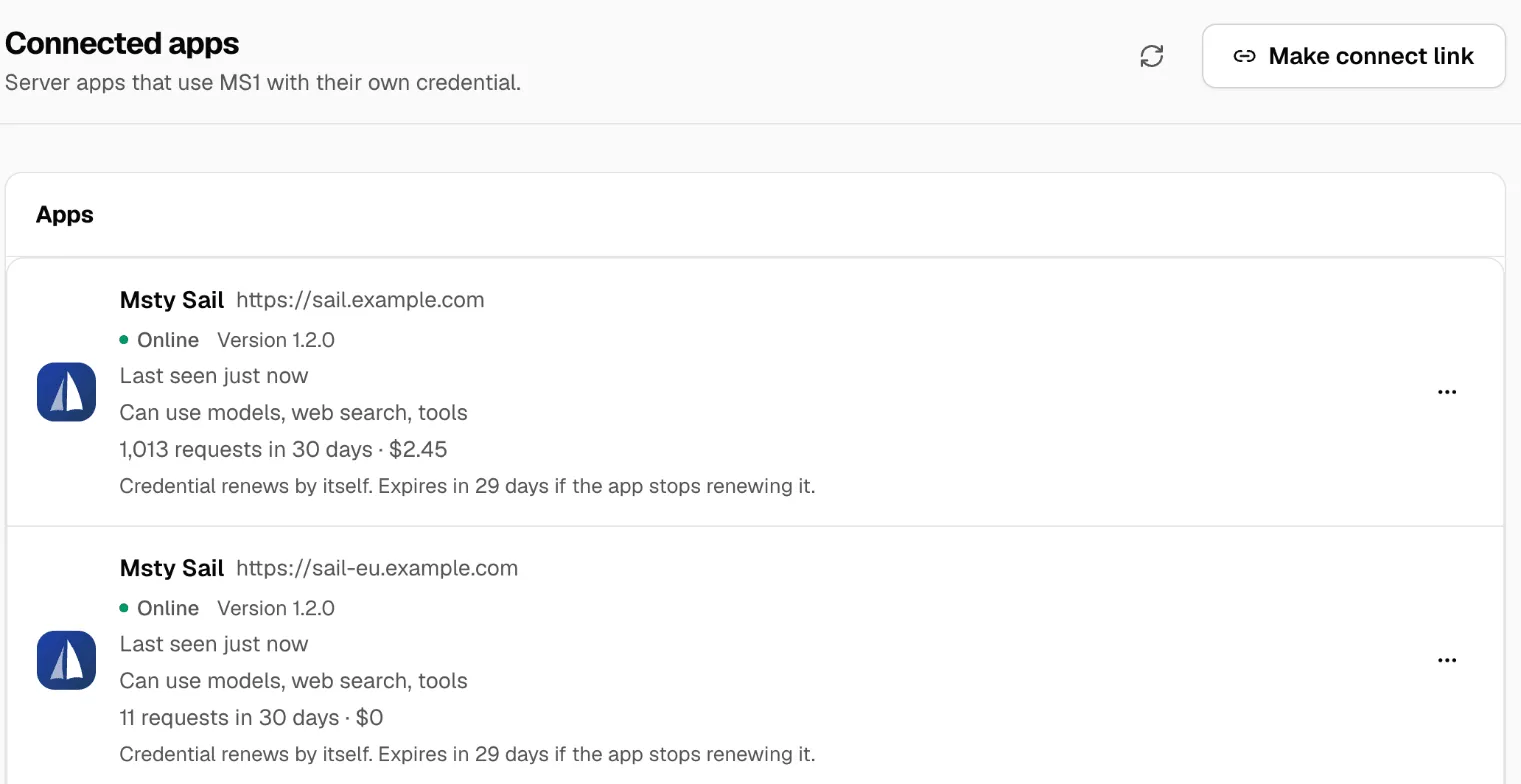
Under Apps, each app shows:
- Online, Offline, Approved, not connected yet or Disconnected
- Last seen, and its Version
- What it Can use
- Reports a problem or Reports an error, when the app says it’s unwell
- When its credential renews, and when it expires if the app stops renewing it
- Recent usage and estimated cost
Apps can send an anonymous ID for each person, so you can group usage and cost by person in Usage. The app should never send a name or email as that ID.
Revoke or remove
Section titled “Revoke or remove”Revoke cuts an app off at once. The app sees that Nexus revoked it, and has to pair again to come back. Revoke when an app is retired, a server is lost, or you no longer trust it. Revoking doesn’t touch your provider keys or other keys.
Remove deletes a disconnected app from the list, once you no longer need its record.
If something goes wrong
Section titled “If something goes wrong”| You see | Do this |
|---|---|
| No request shows up | Check the app uses this machine’s address and can reach it. Make sure you opened Connected apps on the right machine. |
| Request expired | Nobody approved it within 15 minutes. Start pairing again in the app. |
| Approval fails | Every key slot is in use. Remove an unused app or key, or check your plan. |
| The app says it was revoked | Someone clicked Revoke. Pair again. |
| Offline | The app hasn’t checked in for a while. Check the app’s server. |
For app developers
Section titled “For app developers”Any server app can use pairing. The app starts with POST /v1/app-pairings, polls for the credential, and renews it every day with POST /v1/apps/self/credentials/rotate. The credential lasts 30 days, and the old one keeps working for 10 minutes after a renewal. It works like any Nexus key: Authorization: Bearer <token>, or x-api-key for Anthropic SDKs.
For an older Nexus without Connected apps, give the app an Inference only key from Connections instead.