
Copy a model to another machine
Pro
You’ll get: the same model on a second machine, copied over your network instead of downloaded again from the internet. Handy for big models.
You need:
- Two machines in your fleet, both online.
- A model that Nexus downloaded on the first machine. Models that another app owns, or that you linked, can’t be copied.
- Switch to the machine that already has the model.
- Open Models → Library.
- Open the model’s menu (…) and click Copy to….
- Pick the machine to copy to. Nexus shows the size, such as 24 GB to copy, and whether it must install a runtime first.
- Click Continue.
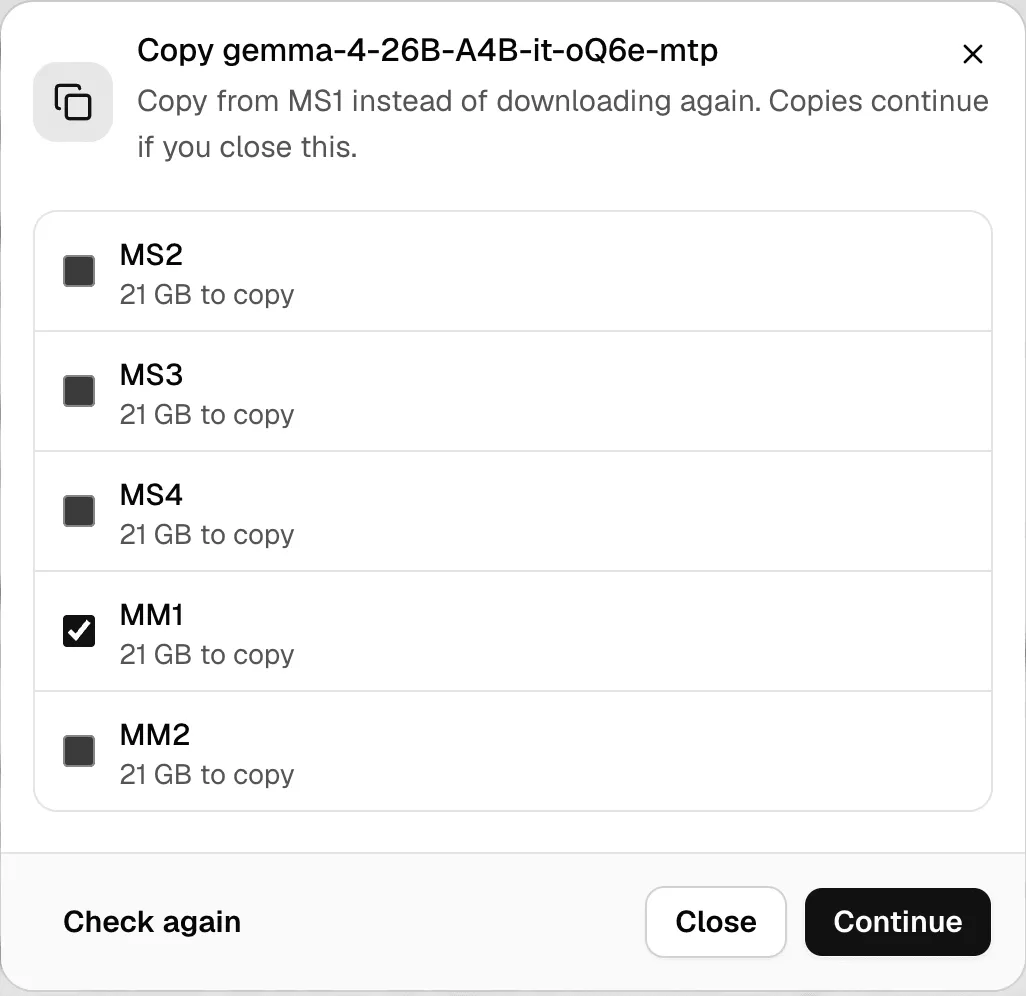
The copy keeps going if you close the dialog. Keep both machines on until it finishes. The other machine checks the whole model before it uses it.
Check it worked
Section titled “Check it worked”Switch to the other machine and open Models. The model is in the Library. Click Load, then try it in Chat Lab.
If something goes wrong
Section titled “If something goes wrong”| You see | Do this |
|---|---|
| Add another machine to your fleet to copy models to it. | Add a machine in Fleet. |
| slower, over VPN | The machines can’t reach each other directly. The copy still works, but takes longer. |
| slower, local network blocked | On that Mac, allow Local Network for Msty Nexus in System Settings → Privacy & Security, then click Check again. |
| Update Nexus on this machine first. | Update Nexus on that machine. |
| Only models downloaded with Nexus can be copied. | Download the model on the other machine instead. |
| Copy failed. Check again to retry. | Click Check again. |
Copying a model doesn’t give anyone new access to it. Team policy, hidden models and key limits still apply on the other machine. More in Models.