
Find out why a request went where it did
You’ll get: the story of one request: when it arrived, which local model answered, whether it waited, retried or failed, and, for a Smart Route, why the route sent it there.
You need:
- An app or script that calls Nexus, and a Nexus API key. See Connect an app.
- For older requests: Metadata-only gateway diagnostics turned on in Settings → Machine → Diagnostics and privacy. It records only from the moment you turn it on.
Find the request ID
Section titled “Find the request ID”First open Activity → Live stream. It shows only what happens while it’s open.
Every Nexus response carries its request ID in the X-Msty-Nexus-Request-Id header. Error replies also carry it in the body, as request_id. Send a request with -i, so curl prints the headers:
curl -i http://127.0.0.1:3939/v1/chat/completions \ -H "Authorization: Bearer msty_nexus_key_here" \ -H "Content-Type: application/json" \ -d '{ "model": "@route/everyday", "messages": [{"role": "user", "content": "Summarize: the review moved to Monday at 10am."}] }'Copy the value, such as nxs_req_ and a random string. Change @route/everyday to the model or route your app uses.
- In the Live stream, paste the ID in the search box (Search messages, models or request IDs).
- Read its events in order: Request received, Request waiting if every slot was busy, Sent to the model, Response started, then Request completed or Request failed. Trying another target means Nexus retried somewhere else.
- For a request from before you opened the page, open Diagnostic logs. Set Event type to Gateway requests, paste the ID in Request ID, and click Apply.
From a terminal, msty-nexusctl logs read --request-id <id> gives the same entries. See Command line.
See why a Smart Route picked that model
Section titled “See why a Smart Route picked that model”- Open Smart Routes → Live.
- Under Request history, find the request by its time, route and key name, and click Details.
- Check that Request ID matches yours.
- Read Why this result, such as Same type of request, stayed on the same model, and Model used. Attempts lists each try when Nexus retried.
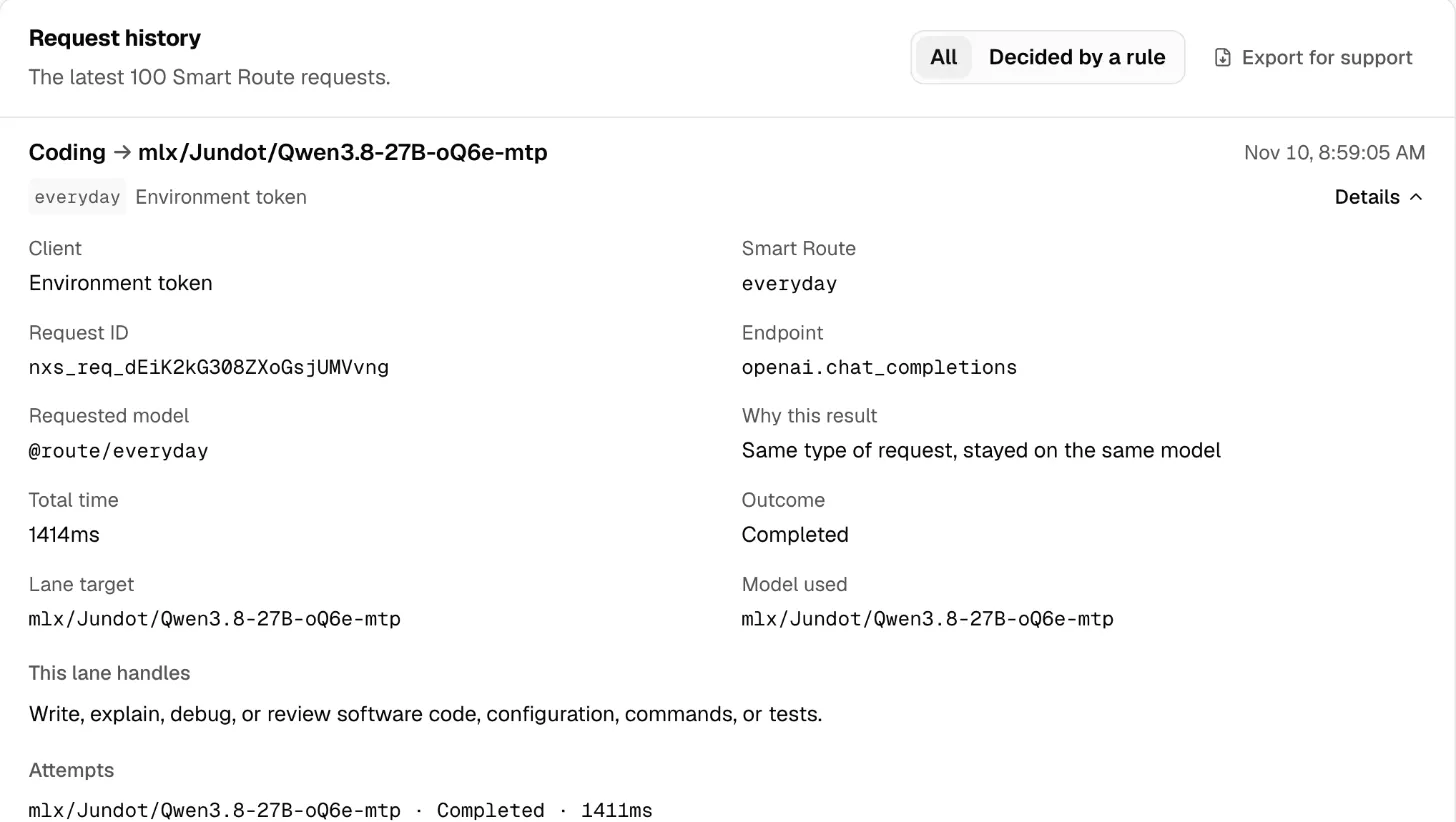
The same reason is in the X-Msty-Nexus-Route-Reason response header, and the answering model in X-Msty-Nexus-Resolved-Model.
Check it worked
Section titled “Check it worked”Send one request to your route with curl -i. Its X-Msty-Nexus-Request-Id shows in the Live stream search, and the same ID shows under Details in Request history, with the local model that answered.
If Request history stays empty, check Request history retention in Settings → Machine → Data retention. More in Activity, Request history and Conversations.