
Keep apps working when your local model is down
You’ll get: one route name for your apps. Requests go to your main local model. When that model is offline or failing, Nexus sends them to a backup model, and the app still gets its answer. With a guard, requests also move while the main model is slow.
You need:
- A Smart Route, such as
Everyday, whose choices send work to your main local model, such as Qwen3.8-27B. - A backup model, such as a smaller gemma-4-26B. Put it on a different local runtime than the main model if you can. If both run on MLX and MLX stops, both stop.
- Open Smart Routes → Routes and click Edit on your route.
- Under Default fallback, pick the backup model.
- Click Save changes.
Nexus now sends a request to the default fallback when:
- the main model is gone, or its provider is turned off;
- recent requests to it failed, so Nexus stops sending it more until it recovers;
- the request fails before the main model answers. Nexus tries the fallback once, so the app still gets a reply.
A busy model isn’t down, so Nexus keeps sending it requests. To move them while it’s slow, add a guard.
Move requests off a slow model
Section titled “Move requests off a slow model”Pro
- In the same editor, under When a target is struggling, click Slow target to the fallback. If the route has guards already, click Add guard.
- Next to If, pick your main local model.
- Next to has, keep Wait for the first words is more than 8000 ms, or change the number.
- Keep Fallback as where the request goes.
- Click Save changes.
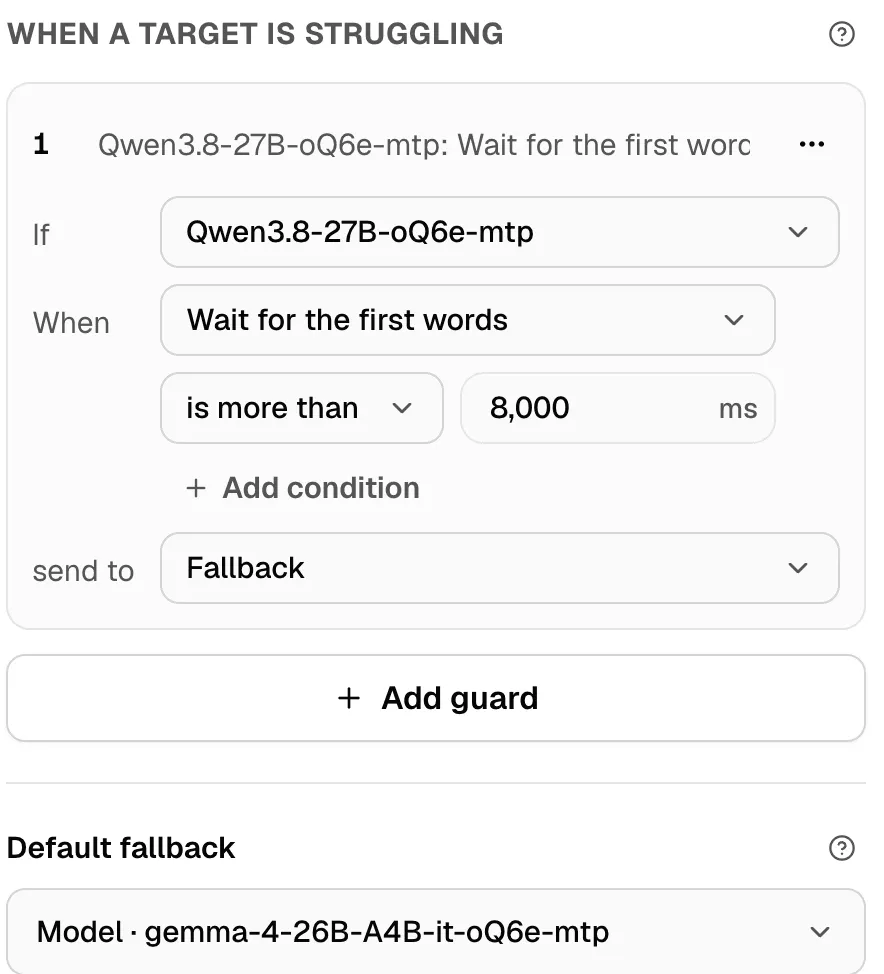
The guard reads the slowest 5% of recent replies. Once those take more than 8 seconds to start, new requests go to the fallback. Each chat stays on the main model, so it goes back there once the model recovers.
If the main target is a Smart Balancer pool, use Every machine in the pool is busy is Yes instead.
Check it worked
Section titled “Check it worked”- Open Providers → Local runtimes and click Stop on the main model’s runtime.
- On the route, click Try in chat and send “Write a haiku about Mondays”.
- Under the reply, Routed to names your backup model.
- Click Start on the runtime again.
In the route’s Live tab, the request shows the fallback with the reason chosen lane unavailable. If the router runs on the runtime you stopped, the reason is router model unavailable. Either way, the backup answered.
Guards, rules and budgets need Pro. If your plan drops to Free, a route with a guard stops running until you remove the guard. More in Budgets and guards and Create a Smart Route.