
Data Protection on Smart Routes
Pro
A Smart Route can check requests for sensitive details, such as names, card numbers or API keys, before they reach a model. You choose which paths are checked and what happens when something is found.
You need Data Protection turned on for the machine first. The route uses the machine’s policy, unless you change it for this route.
A request takes one path through a route: one of its routing choices, or the fallback when no choice fits. Each path has its own switch. A checked path reads the request text before sending it. The rest send it as it arrived.
Checking only the paths that need it keeps the others fast. For example, check the paths that go to online models, and leave the local ones unchecked.
Set it up
Section titled “Set it up”- Open the route in the editor.
- On the Data Protection row, click Set up, or Review checks if it’s already on.
- Under Which requests get checked?, tick the paths to check. Each one shows its target, such as Goes to Qwen3.8-27B-oQ6e-mtp.
- Under When sensitive data is found, pick what happens.
- Click Done, then Save changes.
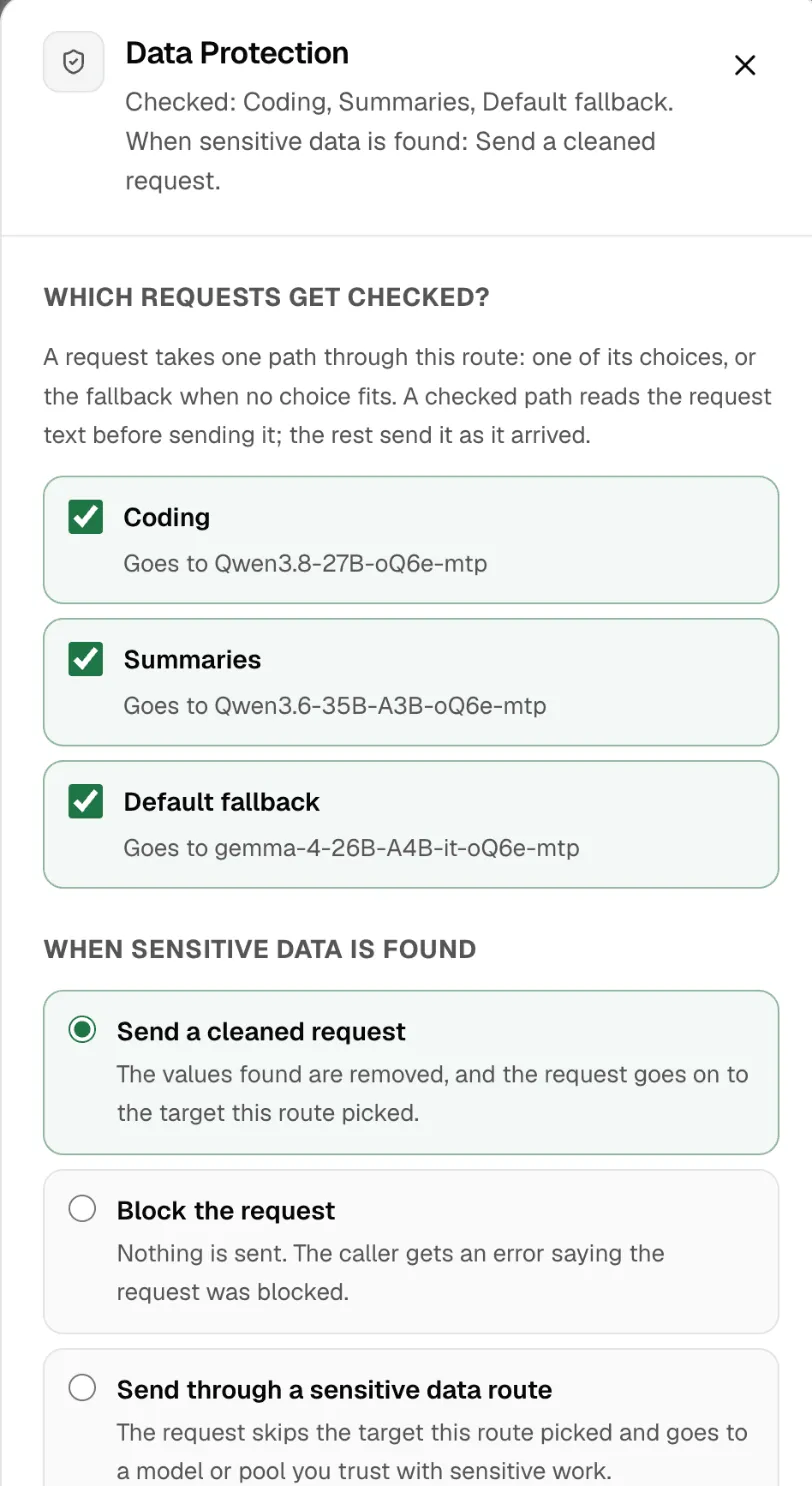
The route’s row then shows its coverage, such as All paths protected or 2 of 3 paths protected.
When sensitive data is found
Section titled “When sensitive data is found”| Choice | What happens |
|---|---|
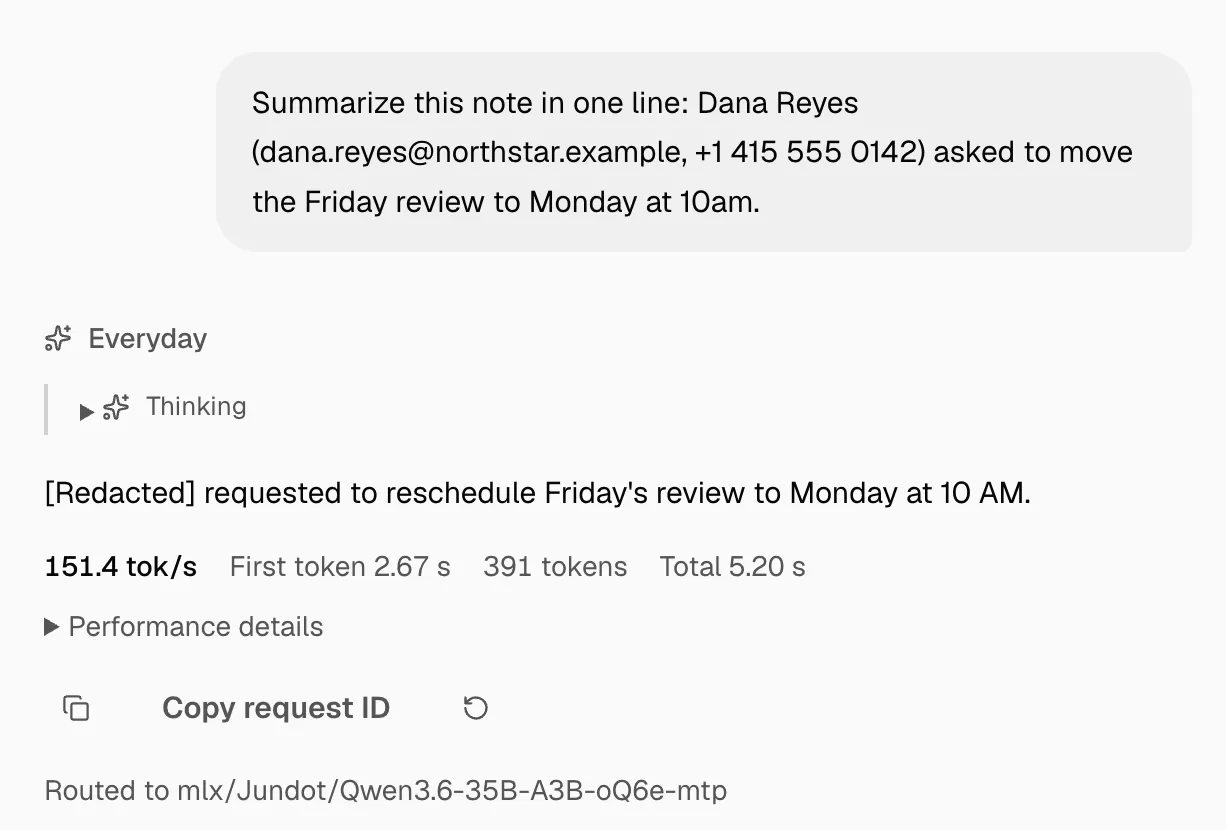
| Send a cleaned request | The values found are removed, and the request goes on to the target the route picked. |
| Block the request | Nothing is sent. The app gets an error, DATA_PROTECTION_BLOCKED, saying the request was blocked. |
| Send through a sensitive data route | The request skips the picked target and goes to a model or pool you trust with sensitive work, such as a local model. |
For Send through a sensitive data route, you also choose:
- The sensitive data route receives: the Cleaned request, or the Original request untouched. Nexus warns you when the route can send the request off this machine with the original data.
- If the sensitive data route is unavailable: Use fallback (the fallback settings below apply), or block. Blocking sends nothing while that route can’t be reached.
Here’s what a model sees with Send a cleaned request. The name, email address and phone number never reached it:
If the check can’t run
Section titled “If the check can’t run”The check needs the privacy model on this machine. If it can’t run, If the check cannot run decides:
- Block (the default): nothing is sent while the check is unavailable. This is the safe choice.
- Send the original request: requests go out unchecked, sensitive data included, whenever the check can’t run. Live routing marks these requests.
What a fallback receives
Section titled “What a fallback receives”A request can reach a fallback after a check already cleaned it, for example when the picked target is down. Under When a fallback takes over, choose what the Default fallback and the Image fallback receive:
- Current request: the request as it stands, cleaned if an earlier check cleaned it.
- Original request: puts the removed data back before sending. Use it only for a fallback you trust with it.
This applies whether the fallback’s own path is checked or not. Nexus never switches it on its own.
Change the policy for one route
Section titled “Change the policy for one route”Under Policy for this route, a route can override the machine’s policy, for this route only:
- Types of detail: a different action for some types. All inherited means none changed.
- Override minimum confidence: be stricter or looser than the machine.
- Rules for this route: patterns that override the machine’s rules when they match.
- Override redaction style: how removed values look.
Each override says what the machine uses, so you can see what you’re changing.
Rules that read sensitive data
Section titled “Rules that read sensitive data”A rule can test Private data found, for example to send health questions to a local model. Then Nexus checks the request before the rules run, instead of after the target is picked. The request is still checked only once.
A conversation where sensitive data was found stays on this machine. It never moves to an online model. See Conversations.
What the check covers
Section titled “What the check covers”It reads request text: messages, system text, tool inputs and prompt variables. It can’t read images, audio, files or encoded content, and it can miss unusual details or remove ones you wanted kept.
See what it found
Section titled “See what it found”- The Live tab’s Data Protection card counts requests Checked, Sensitive data found, Cleaned, Blocked and Sent to sensitive data route.
- In the decision stream, each checked request shows what was found, by type, and how sure the check was, such as 92% sure. From there, Ignore … on this route stops flagging that type on this route, and Add allow rule… lets a specific value through.
- Apps see
X-Msty-Nexus-Data-Protection: applied, how many values were removed inX-Msty-Nexus-Data-Protection-Redactions, and the types inX-Msty-Nexus-Data-Protection-Categories.
Nexus records counts and types, never the text.
If something goes wrong
Section titled “If something goes wrong”| You see | Do this |
|---|---|
| Data Protection needs setup | Turn on Data Protection for the machine. |
| Every request to a path is blocked | The check can’t run. Check the privacy model on the Data Protection page. |
DATA_PROTECTION_BLOCKED |
The request held something the policy blocks, such as an API key. Remove it, or change the policy. |
SMART_ROUTE_PRIVATE_TARGET_UNAVAILABLE |
The sensitive data route is down, and it’s set to block. Start it, or choose Use fallback. |
| A value you need is removed | Add an allow rule for it from the decision stream, or lower the action for its type on this route. |