
Switch models without touching your apps
You’ll get: one stable model name, such as nexus-coder, for all your apps. When a better local model comes out, you move the name to it in Nexus. Every app that uses the name switches, with no change to the apps.
You need:
- A local model your apps should use now, such as Qwen3.8-27B. See Models.
- A Nexus API key. Make one in Connections.
Add the alias
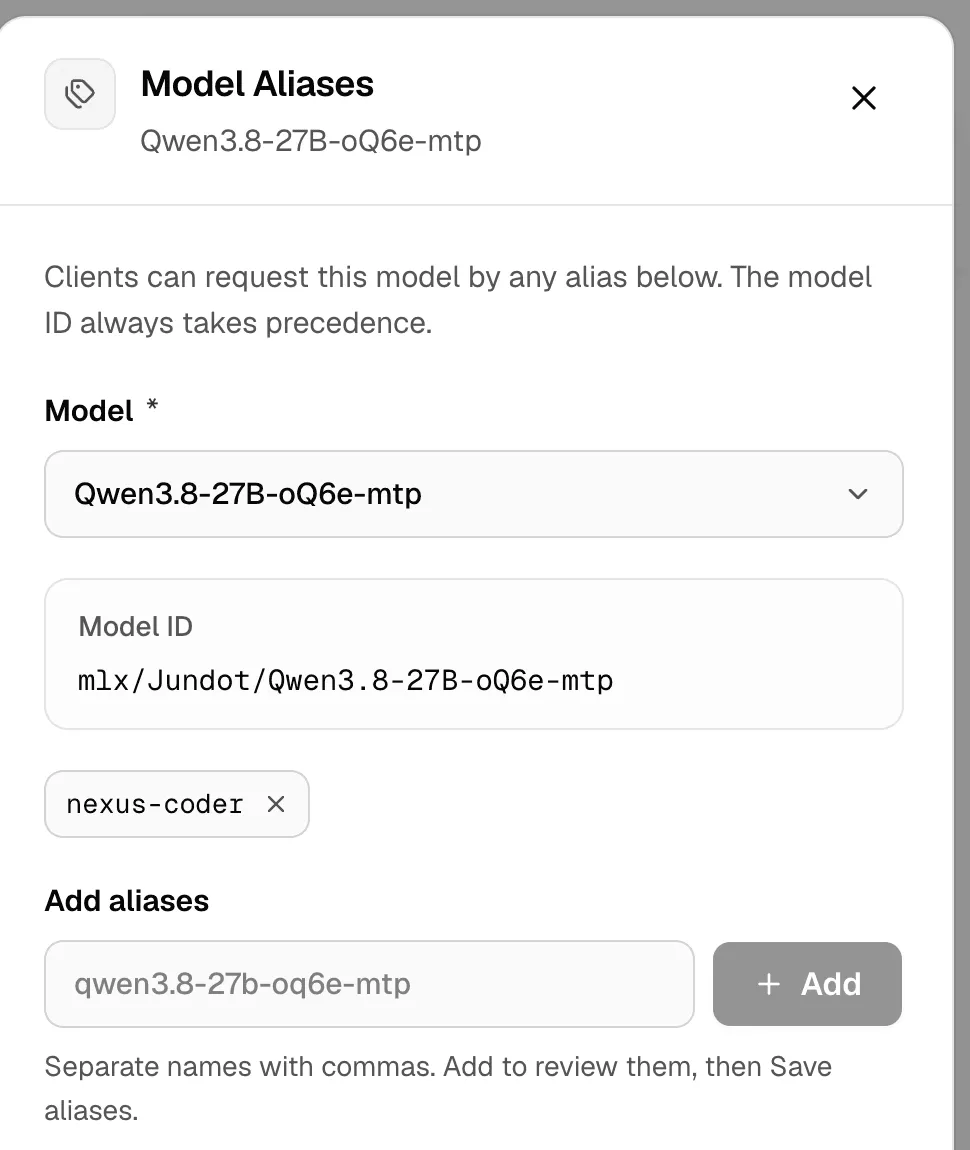
Section titled “Add the alias”- Open Model Aliases and click Add alias.
- Under Model, pick Qwen3.8-27B.
- Under Add aliases, type
nexus-coderand click Add. - Click Save aliases.
Point your apps at it
Section titled “Point your apps at it”Use the alias wherever the app asks for a model:
curl http://127.0.0.1:3939/v1/chat/completions \ -H "Authorization: Bearer msty_nexus_key_here" \ -H "Content-Type: application/json" \ -d '{"model": "nexus-coder", "messages": [{"role": "user", "content": "Write a test for this function"}]}'Put your API key in place of msty_nexus_key_here.
Move it to a new model
Section titled “Move it to a new model”An alias belongs to one model at a time. Nexus refuses a name that another model already uses, so you remove it first, then add it again.
- On Model Aliases, find
nexus-coderunder Qwen3.8-27B and click its delete button (Delete alias nexus-coder). Click Delete alias to confirm. - Click Add alias, pick the new model, such as Qwen3.6-35B-A3B, type
nexus-coderunder Add aliases and click Add. - Click Save aliases.
Check it worked
Section titled “Check it worked”List the models your key can see:
curl http://127.0.0.1:3939/v1/models -H "Authorization: Bearer msty_nexus_key_here"The list has an entry with "id": "nexus-coder". Its msty_alias_for names the model behind it. Send a request with the alias, and Activity → Live stream shows the new model.
When apps can’t see the alias
Section titled “When apps can’t see the alias”- An alias shows only while its model is visible and working. Hide or remove the model, and the alias goes too.
- A key that can’t use the model can’t use its alias either. Team policy and key limits apply to the model behind it.
- Chat Lab shows only aliases for chat models its selected key may use.
A real model ID always wins over an alias. More in Model Aliases. For fixed settings with the name, use a preset.