
Budgets and guards
Pro
Two tools keep a route fast and affordable:
- A monthly budget lets rules react to what the route has spent.
- Guards watch a target and move a request away while that target is struggling.
Both are in the route’s full editor (Edit on the route).
Monthly budget
Section titled “Monthly budget”A budget is the most the route should spend on paid models in a month, on this machine, in US dollars. On its own it changes nothing. Rules read it, as This route’s spend this month, a percent of the budget.
Set a budget
Section titled “Set a budget”- Under Rules, next to Monthly budget, click Set a budget.
- Enter the Budget per month, in US dollars, from $0.01 up.
- Click Save changes.
The editor then shows the spend so far, such as $12.40 of $50.00 this month, and when it Resets.
How spend is counted
Section titled “How spend is counted”- On this machine only. Each machine counts its own spend for the route.
- Paid models only. Local models cost nothing.
- From published prices. A model with no published price isn’t counted. The editor names those models, and how many requests weren’t counted.
- Calendar months. The budget resets at midnight on the first day of each month, in the time zone shown under the budget (Months are counted in …). The zone is saved with the budget, so a shared route means the same month everywhere.
- Needs Usage. If usage tracking is off in Settings, spend isn’t counted and spend rules never run.
React to spend
Section titled “React to spend”The starter rule Over budget to a local model does the common thing: when the route has spent at least 80% of its budget, send requests to a local model.
You can build your own steps, top to bottom:
| Rule | When | send to |
|---|---|---|
| 1 | This route’s spend this month is at least 100% | A small local model |
| 2 | This route’s spend this month is at least 80% and Prompt size is at least 8,000 tokens | A larger local model |
Watch for the warning This rule runs when spend is high, but … is not a local model: sending over-budget requests to another paid model adds to the spend.
Guards
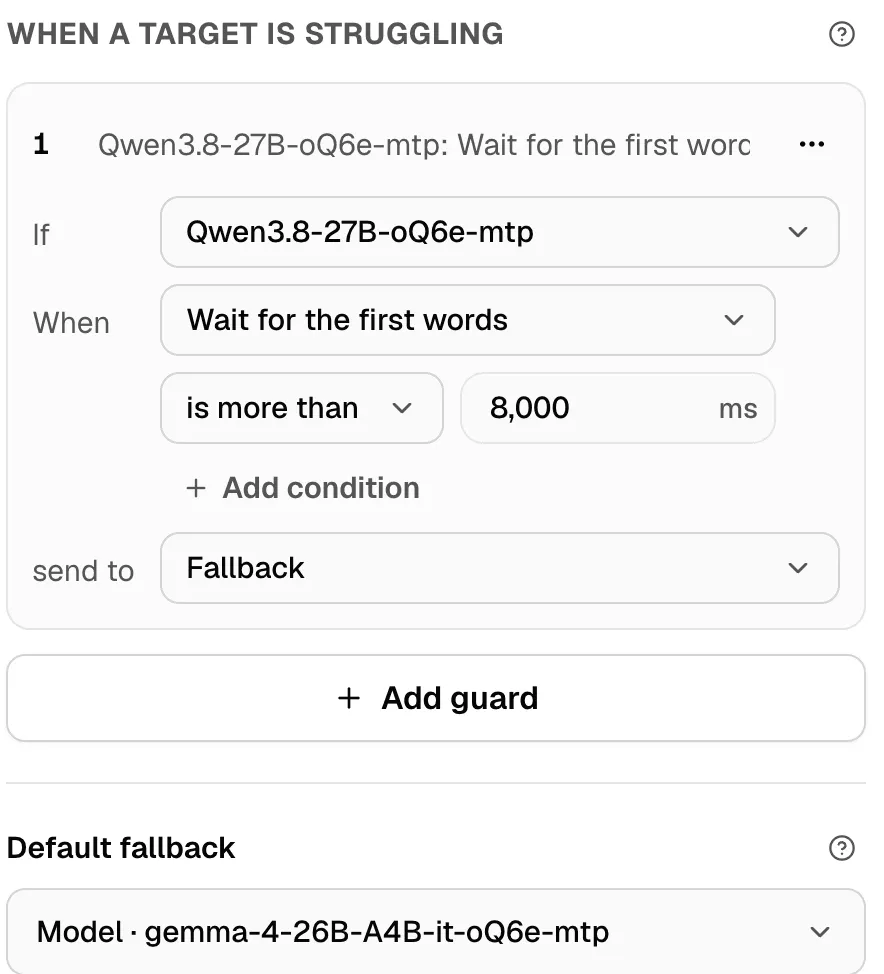
Section titled “Guards”A guard watches one target. When that target is struggling, the guard sends that one request somewhere else. The conversation stays where it was, so its next message goes back once the target recovers.
Guards run after the target is picked, whether by a rule, the router, a conversation’s earlier choice, or the fallback.
Add a guard
Section titled “Add a guard”- Under When a target is struggling, click Add guard, or the starter Slow target to the fallback.
- Next to If, pick the target to watch.
- Next to has, pick a fact, a comparison and a value. Add more lines if you need them; every line must match.
- Pick where to send the request: a model, a preset, a pool, or the Fallback.
- Click Save changes.
A route can have up to 20 guards, each with up to 8 lines. When several guards watch the same target, the first one that matches wins.
What a guard can watch
Section titled “What a guard can watch”| Fact | Compare with | Notes |
|---|---|---|
| Wait for the first words | milliseconds | The slowest 5% of recent replies. |
| Reply speed | tokens a second | In recent replies. |
| Recent errors | 0 to 1 | 0 is no errors; 1 is every reply failed. |
| Asked Nexus to slow down | Yes or No | The provider refused with a rate limit and the wait hasn’t ended. |
| Every machine in the pool is busy | Yes or No | For a Smart Balancer pool target only. |
| This route’s spend on it this month | US dollars | On this machine. |
Examples
Section titled “Examples”| Guard | Why |
|---|---|
| If the coding model has Wait for the first words is more than 8,000 ms, send to the fallback | Keep replies coming while a big local model is busy. |
| If the online model has Asked Nexus to slow down is Yes, send to a local model | Ride out a provider’s rate limit. |
| If the pool has Every machine in the pool is busy is Yes, send to a smaller local model | Don’t queue behind a full pool. |
| If the online model has This route’s spend on it this month is at least 40, send to a local model | Cap what one model can cost. |
A guard isn’t for a model that’s down
Section titled “A guard isn’t for a model that’s down”A target that’s down already goes to the fallback, without a guard. Guards are for targets that still answer, but badly.
Warnings
Section titled “Warnings”| Nexus says | What it means |
|---|---|
| No choice, rule, or fallback of this route sends to …, so this guard never runs. | The guard watches a target the route never uses. |
| … is not a pool, so this line never matches. | Every machine in the pool is busy only works on a pool. |
| A guard’s target model is unavailable. Its requests go to the fallback. | Start the guard’s target model, or pick another. |
See it working
Section titled “See it working”In the Live tab and in request history, a request a guard moved carries a Guard badge and says Guard … moved this off a struggling target, to …. Apps see the guard’s ID in the X-Msty-Nexus-Route-Guard response header. See Use from apps.
If you change plans
Section titled “If you change plans”Budgets and guards are part of conditional routing. If your plan drops below Pro, a route that has a budget, guards or rules stops running as a whole until you upgrade or remove them. Nothing is deleted. See Conditional rules.