
Conditional rules
Pro
A rule is an exact test that runs before the router. The first rule that matches sends the request to its target, and the router isn’t asked. Requests no rule matches go to the router as usual.
Use rules for things you can measure: how long the prompt is, whether it has images, which app is asking, what time it is, or how much the route has spent. Use routing choices for things only a model can judge, such as “is this a coding question?”.
Add a rule
Section titled “Add a rule”- Open the route in the full editor (Edit on the route).
- Under Rules, click Add rule, or a starter:
- Long prompts to the fallback: prompt size is at least 24,000 tokens, send to the fallback.
- Over budget to a local model: the route’s spend this month is at least 80% of its budget, send to a local model.
- Next to When, pick a fact, a comparison and a value.
- Click Add condition for another line. Every line must match.
- Next to send to, pick the target.
- Click Save changes.
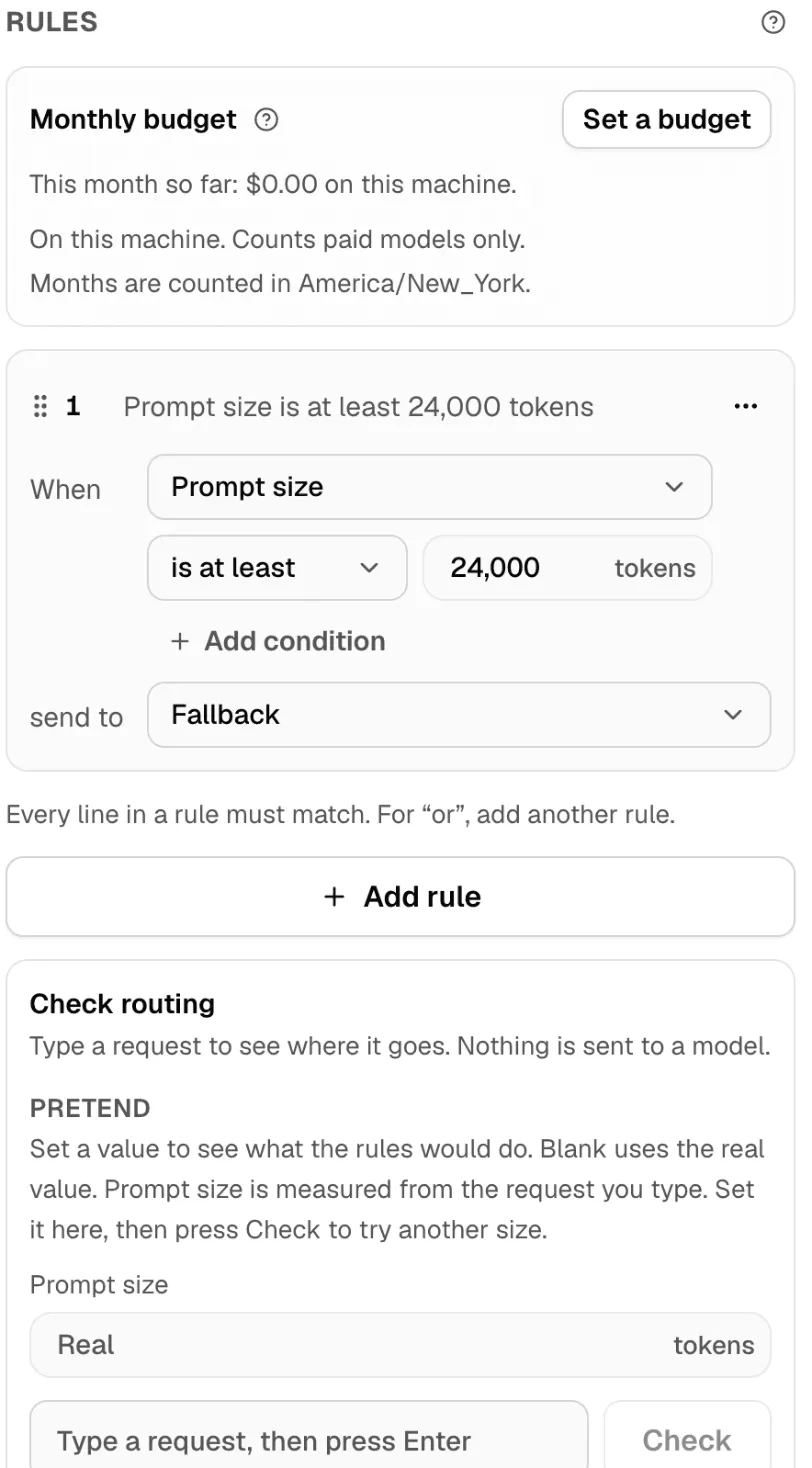
Nexus names the rule from its lines, such as “Prompt size is at least 24,000 tokens”. Click the name to change it.
How rules are read
Section titled “How rules are read”- Top to bottom. The first match wins. Put narrow rules above broad ones. Drag a rule by its handle, or use Move up and Move down in its menu.
- All lines in a rule must match. For “this or that”, make two rules with the same target.
- A chat a rule sends somewhere stays there. Later messages in that conversation go to the same target. See Conversations.
- If a rule’s target is down, the rule is skipped. The next matching rule with a working target takes the request. If there is none, the fallback does.
A route can have up to 20 rules, and a rule up to 8 lines.
What a rule can test
Section titled “What a rule can test”| Group | Fact | Compare with | Notes |
|---|---|---|---|
| This request | Prompt size | a number of tokens | Estimated from the prompt’s length. |
| Reasoning effort asked for | Off, Minimal, Low, Medium, High, Max | No match when the request doesn’t say. | |
| Request has images | Yes or No | An image anywhere in the request. | |
| Request offers tools | Yes or No | The request lists tools the model can call. | |
| Private data found Pro | types of detail, such as health | From Data Protection. Only on a route with a checked path. | |
| Who is asking | Tokens this key used today | a number of tokens | The API key that sent the request. |
| Tokens this key used this month | a number of tokens | ||
| This key’s labels | words, such as batch |
Labels you set on the key in Connections. | |
| This conversation | Turns in this chat | a number | Messages the person sent, this one included. |
| Tokens this chat used | a number of tokens | On this route and machine, before this turn. | |
| Time | Hour of the day | 0 to 23 | In the route’s time zone. |
| Day of the week | Monday to Sunday | ||
| Business hours | Yes or No | Monday to Friday, 9:00 to 17:00. | |
| This route | This route’s spend this month | a percent of the budget | Needs a monthly budget. |
| A share of chats | 0 to 100 | A number that stays the same for a chat. Use it to try a new target on some chats. |
The comparison depends on the fact:
| Kind of fact | Comparisons |
|---|---|
| Numbers | is at least, is more than, is at most, is less than, is exactly |
| Yes or no | is |
| A pick from a list (effort, day) | is one of, is none of |
| Words (labels, types of detail) | includes, includes any of, includes none of |
Time zone. The route saves the time zone of the machine it was created on, and shows it under the rules: Times are read in …. That way a route shared with machines elsewhere keeps the same hours.
Labels use lowercase letters, numbers, dots, dashes and underscores. A key can have up to 16 labels. Labels only group keys for rules: they grant nothing.
Where a rule can send
Section titled “Where a rule can send”| Target | What happens |
|---|---|
| Fallback | The route’s default fallback. |
| Router model | The router picks one of the route’s choices, as if no rule had matched. Rules below it aren’t read. |
| A model | Any model on this machine, local or online. |
| A preset | A preset, with its settings. |
| A pool | A Smart Balancer pool. |
A rule can’t send to one of the route’s routing choices. Picking a choice is the router’s job; send to Router model for that.
Examples
Section titled “Examples”Keep long documents on a large-context model
Section titled “Keep long documents on a large-context model”| When | send to |
|---|---|
| Prompt size is at least 24,000 tokens | A local model with a long context |
Images go to a vision model
Section titled “Images go to a vision model”| When | send to |
|---|---|
| Request has images is Yes | A vision model, such as Gemma |
Batch jobs never use paid models
Section titled “Batch jobs never use paid models”Add the label batch to the keys your batch jobs use, in Connections.
| When | send to |
|---|---|
This key’s labels includes batch |
A local model |
Heavy users move to a local model
Section titled “Heavy users move to a local model”| When | send to |
|---|---|
| Tokens this key used today is at least 200,000 tokens | A local model |
Outside business hours, stay local
Section titled “Outside business hours, stay local”| When | send to |
|---|---|
| Business hours is No | A local model |
For weekends only: Day of the week is one of Saturday, Sunday.
Try a new model on 10% of chats
Section titled “Try a new model on 10% of chats”| When | send to |
|---|---|
| A share of chats is less than 10 | The new model |
The share is fixed for a chat, so a conversation doesn’t switch models halfway. Compare the two in Usage and the Insights tab.
Health questions stay local
Section titled “Health questions stay local”Enterprise
Turn on Data Protection for the route’s paths first.
| When | send to |
|---|---|
| Private data found includes health | A local model |
Two lines in one rule
Section titled “Two lines in one rule”| When | and | send to |
|---|---|---|
| Request offers tools is Yes | Turns in this chat is more than 20 | A strong agent model |
Check your rules
Section titled “Check your rules”Check routing, under the rules, shows where a request would go. It runs your rules and the router, but sends nothing to a model.
- Type a request in Try a request and press Enter, or click Check.
- Read the result, such as Rule 1 sends it to … or Goes to Summaries on …, and which facts it read.
Some facts can’t come from a typed request, so you can set them under Pretend:
- Prompt size is measured from what you type. Set it to try another size.
- A check has no API key, so key usage and labels are unknown unless you set them.
- Time is read now, and a chat’s share from its text.
Leave a field blank to use the real value. Use real values resets them all.
Warnings in the editor
Section titled “Warnings in the editor”| Nexus says | What it means |
|---|---|
| This rule never runs: rule … matches every request it would. | A rule above it is broader. Move this one up, or narrow the other. |
| This rule runs only when rule … matches but its target is not available. | It works as a backup for that rule. Fine if that’s what you want. |
| This rule reads the route’s spend, but the route has no budget. | Set a monthly budget. |
| … is not available now. Until it is, this rule is skipped. | Start the model, or pick another target. |
| If … is down, these requests go to the fallback, …, which is not a local model. | Add a second rule with the same lines and another local target, to keep the requests local. |
| This rule reads the private data found, but no path of this route has Data Protection on. | Turn on Data Protection for the route’s paths. |
| This rule runs when spend is high, but … is not a local model, so it may add to the spend. | Send over-budget requests to a local model instead. |
If you change plans
Section titled “If you change plans”Without Pro, the Rules section shows Conditional routing with an upgrade note.
If your plan drops, a route that has rules, guards or a budget stops running as a whole. Nexus never runs such a route with its rules ignored, because that could send requests where the rules said they must not go. Nothing is deleted. To use the route on Free, remove its rules, guards and budget, or upgrade again.