
Give an app only some models and tools
Pro
You’ll get: an API key for one app that can use only what you allow. For example: one Smart Route, no other models, and a tool that waits for your approval before each call.
You need:
- The models, routes or presets the app should use.
- Tools in Tools Gateway, if the app uses tools.
- Open Connections → Client API keys and click Create API key, or open an existing key’s menu and click Edit.
- Name the key after the app, such as “Support bot”.
- Keep Access role on Inference only.
- Under What this key can use, pick Only what I choose.
- Untick All models, Smart Routes, and presets, then tick only what the app needs. They’re grouped under Models, Smart Routes and Presets.
- Under Tool access, pick No tools, All tools, or Custom.
- With Custom, set a rule for each integration or tool: Allow, Ask, Admin approves or Block.
- Click Create (or Save changes).
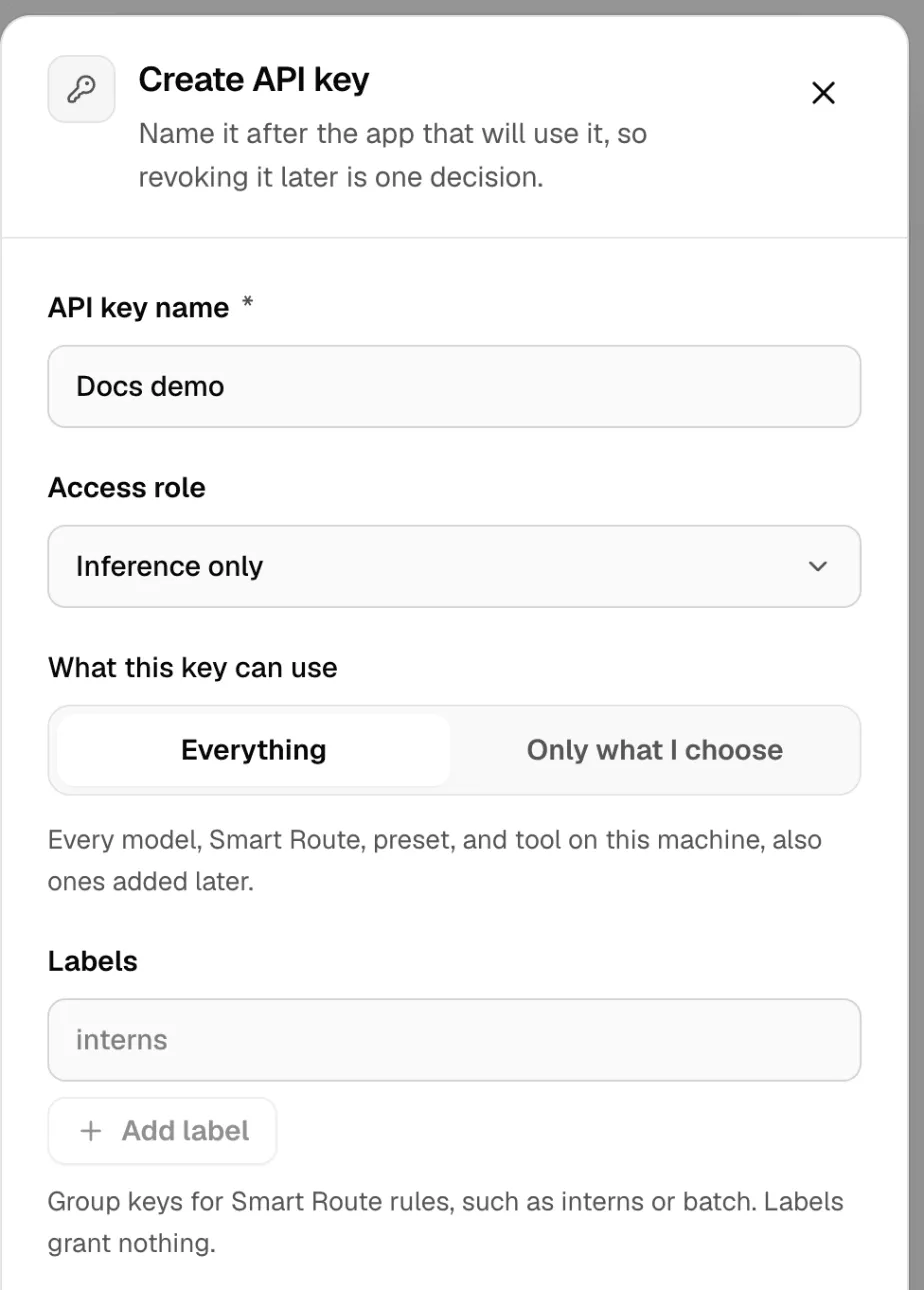
A list is strict. A key that names one Smart Route can’t call the models behind it directly.
Admin approves holds each call until someone approves it in Tools Gateway → Approvals. Calls wait up to 10 minutes.

Check it worked
Section titled “Check it worked”Call /v1/models with the key. It lists only what you picked:
curl http://127.0.0.1:3939/v1/models -H "Authorization: Bearer $KEY"A request for anything else fails. More in Connections and Tools Gateway.