
Run a model too big for one Mac
Enterprise
You’ll get: one large model, such as a 420 GB model, running across two or more Macs. Your apps call it with one model name, and the work stays on your own hardware.
You need:
- 2 or more Apple silicon Macs in your fleet, each running Nexus with Cluster in its plan. Every Mac needs the same Nexus version.
- macOS 26 or later on each Mac.
- Thunderbolt cables from every Mac to every other Mac.
- RDMA turned on on each Mac: start the Mac in Recovery, open Terminal, run
rdma_ctl enable, then restart. - Every Mac awake, on power, and on a trusted local network.
You don’t copy the model to each Mac yourself. When it loads, Nexus reuses the files a Mac already has and shares or downloads the rest.
- On the Mac that will manage the cluster, open Cluster. Pick a Mac that stays on the whole time, such as MS1.
- Click Add Macs. Under Choose machines, tick the Macs to use, such as MS1 to MS4, then click Add selected.
- If Nexus asks Allow local network connections?, click Allow connections and add.
- On the Macs card, click Check cluster. Fix each problem it shows, then click Check again until it says Everything works.
- Click Help me choose to open Cluster Advisor. Pick a Priority, a Main use, the Context per conversation and Conversations at once. Click Show suggestions, then the Review button on the best match. If you already know the model, click Load a model instead and pick it.
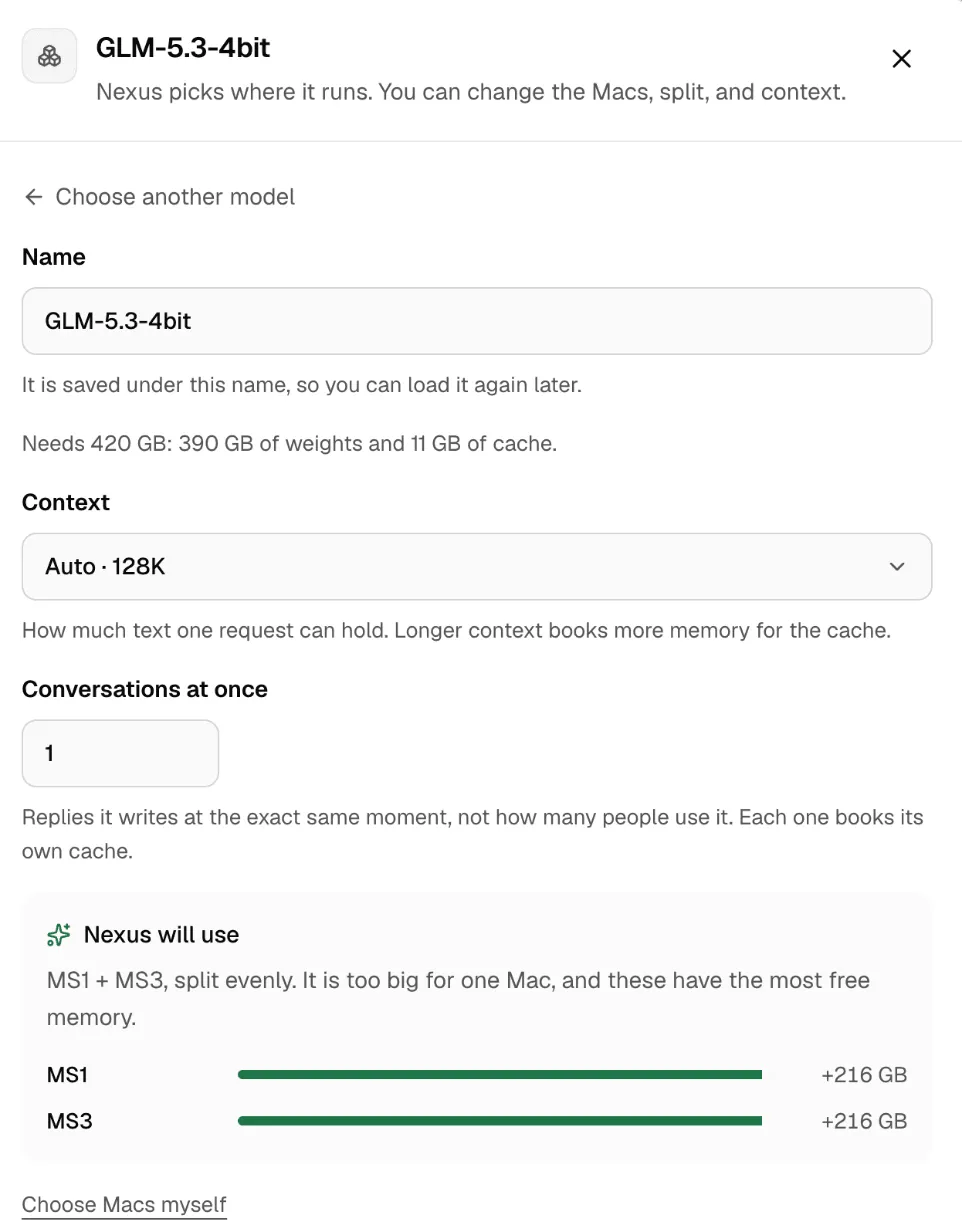
- Check Nexus will use: the Macs and the split. To pick yourself, click Choose Macs myself.
- Set Context and Conversations at once. Both book memory on every Mac the model uses.
- Click Load. A large model can take several minutes. You can leave the page and follow it in Activity.
- When the model is ready, open it and copy its model address, such as
cluster/mlx-community/GLM-5.3-4bit.
A split model needs every Mac it uses. If one Mac sleeps or loses its cable, the model stops answering. It doesn’t slow down.
Check it worked
Section titled “Check it worked”On the managing Mac, send a request with your key and the address you copied:
curl http://127.0.0.1:3939/v1/chat/completions \ -H "Authorization: Bearer msty_nexus_key_here" \ -H "Content-Type: application/json" \ -d '{ "model": "cluster/mlx-community/GLM-5.3-4bit", "messages": [{"role": "user", "content": "Say hello."}] }'You get a reply. On the Overview tab, the model shows the Macs it runs on and its tokens per second. To measure how many replies it handles at once, use the Cluster tab in Benchmarks.
More in Cluster.